0 ratings






Nº de artículo:
139711196
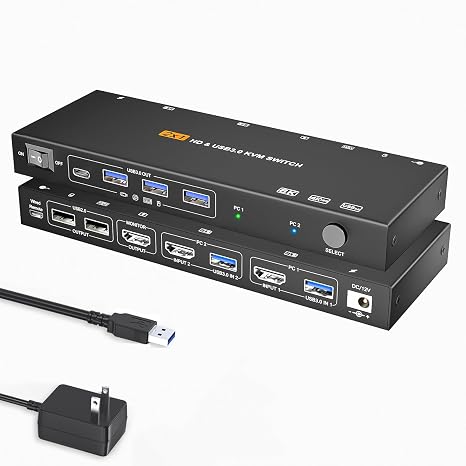
HDMI KVM Switch 1 Monitors 2 Computers 8K60Hz USB3.0 KVM Switch for 2 Computers Share Dual Monitors and 4 USB Devices withRemote Control
Nº de artículo:
139711196
GTQ 335
Price Details
Excluding Shipping & Custom charges ( Shipping and custom charges will be calculated on checkout )
*All items will import from Estados Unidos
0 ratings
Escribe una opinión
En stock
 Importado de la tienda USA
QTY:
Solo queda 1 artículo en stock.
Haz tu pedido ahora y recíbelo por ahí Martes, Julio 14
Secured transaction
Ubuy works hard to protect your security and privacy. Our advanced payment security system ensures confidentiality by encrypting your information during transmission using AES (Advanced Encryption Standards) and SSL (Secure Socket Layer) protocols. Your payment details are 100% secure as we do not share your payment details with third party sellers.
Our Top Logistics Partners


Easily switch between two hosts, which keeps your workspace tidy, and helps to maximize productivity.

Fast
Shipping

Free
Return*

Secure Packaging

100% Original Products

PCI DSS Compliance

ISO 27001 Certified


What Stands Out
8K Resolution Support
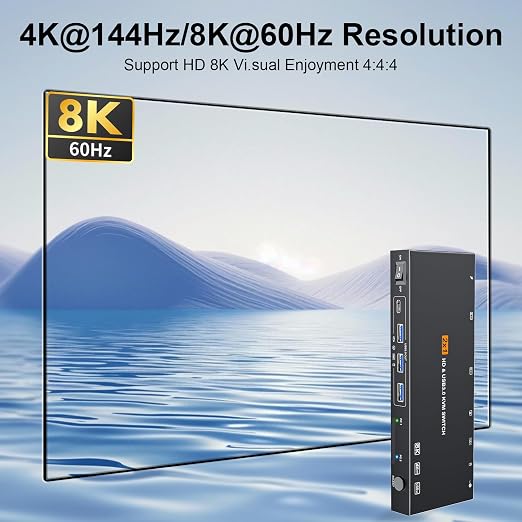
Experience stunning visuals with 8K60Hz resolution, ensuring sharp images and vibrant colors for ultimate clarity while switching between devices.
EDID Simulation
Maintain display settings across multiple machines with EDID simulation, ensuring consistent resolution and refresh rates, enhancing user convenience.
USB 3.0 Hub
Enjoy high-speed data transfer for up to four USB devices, streamlining your workspace by simplifying access and connectivity between your computers.
Detalles de producto
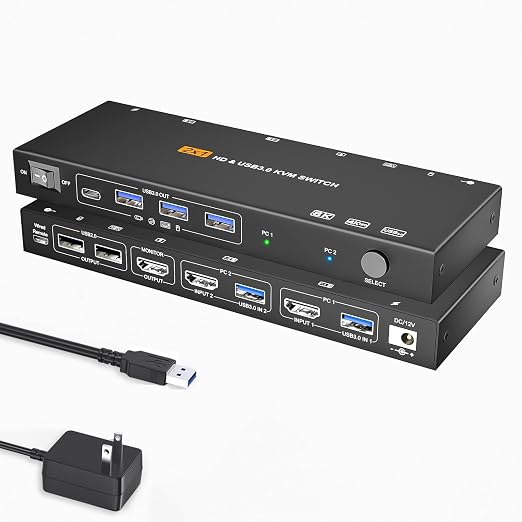
- NOTE: 1, Each PC must be connected with an HDMI cable (for video transfer) and a USB 3.0 cable (for data transfer Keyboard/Mouse etc.) for normal use. 2, For stable use, please use 12V1A the power adapter to connect to the power source for power supply. 3, supported for use with docking station【USB C to HDMI + USB docking station】. 4, This KVM switch is NOT a DP KVM switch or USB-C KVM switch.
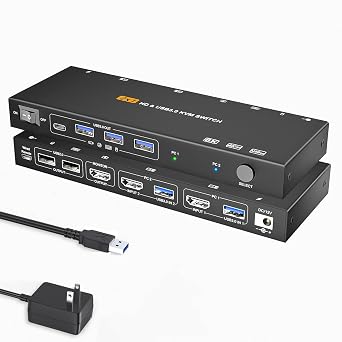
- KVM Switch 1 Monitors 2 Computers: This HDMI KVM Switch can control 2 computers to share 1 monitor and 4 USB 3.0 and 2 USB2.0 devices. such as a set keyboard, mouse, hard drives, U disk, and printer. It's not only a keyboard mouse switch Switch, but also an HDMI switch. You can easily switch between two hosts, which keeps your workspace tidy, and helps to maximize productivity
- 【Ultra HD 8K Resolution】The HDMI KVM switch supports resolutions up to 8K@60Hz,4K@144Hz, allowing images to be displayed more beautifully and realistically, and colours will be more vivid and dynamic, and backward compatible with 3840*2160@144Hz, 1920*1080P@240Hz, 1920*1080P@240Hz, etc. Note: KVM requires a high-quality HDMI 2.0 standard cable no longer than 3.3 feet in length, and ensure that your computer and monitor support 8K to ensure the transmission of video signals!
- 【4 USB 3.0 ports】KVM switches features 4 USB 3.0 and 2 USB2.0 ports for ultra-fast data transfer speeds of up to 5Gbps. It allows you to seamlessly share peripherals like printers and external drives between two computers, reducing clutter and enhancing efficiency. Ideal for sharing USB devices such as keyboards, mice, scanners, printers, and flash drives, this switch automatically detects and matches connected devices【NOTE:Keyboard and mouse connected to the black USB2.0 port】
- 【Broad Compatibility & 2 Switching Methods】USB 3.0 HDMI KVM Switch is compatible with a wide range of operating systems including Windows (11/10/8/Vista/XP etc.), Mac OS, and Linux. It also works effortlessly with major HDMI devices such as PS5/4,mini 4 Pro, Xbox One, and PC, allowing easy switching between computers with a physical button or wired remote, LED indicate the active computer
| Operation Mode | OFF-NONE-ON |
| Current Rating | 1 Amps |
| Operating Voltage | 12 Volts |
| Contact Type | Normally Closed |
| Connector Type | Plug In |
| Switch Type | DIP Switch |
| Terminal | Solder |
| Circuit Type | 1-way |
| Mounting Type | PCB Mount |
| Lower Temperature Rating | 50 Degrees Celsius |
| Upper Temperature Rating | 50 Degrees Celsius |
| Control Method | Remote |
| Connectivity Protocol | Wired |
| Control Type | Remote |
| Compatible Devices | Computers, Gaming Consoles (PS5/PS4/Xbox One), USB Devices (Keyboards, Mice, Printers, External Drives, Flash Drives) |
| Smart Home Compatibility | Not Smart Home Compatible |
| Color | Black |
| Item Dimensions | 7.87 x 1.57 x 0.79 inches (20 x 4 x 2 cm) |
| Material Type | Metal |
| Contact Material | Metal |
| International Protection Rating | IP00 |
| Specification Met | CCC |
| Brand Name | TBDISYYDS |
| Model | TB-010KM |
| Manufacturer | TBDISYYDS |
| Part Number | TB-010KM |
| Included Components | KVM |
| Brand | TBDISYYDS |
| Material | Metal |
| Item dimensions L x W x H | 7.87 x 1.57 x 0.79 inches (20 x 4 x 2 cm) |
What's in the box
KVM
Who Should Buy?

-
Multitasking Professionals
Ideal for users who operate multiple computers simultaneously, such as software developers and graphic designers.
-
Home Office Users
Perfect for remote workers who need to switch between computers while sharing peripherals and monitors.
-
Gaming Enthusiasts
Great for gamers who want to switch between gaming consoles and PCs without hassle using dual monitors.

-
Casual Users
Not suitable for users who only occasionally use one computer and don’t need multiple monitor setups.
-
Non-Technical Users
Can be complicated for those unfamiliar with KVM switches or who seek a simple plug-and-play solution.
-
Low-Resolution Needs
Users who don't require 8K resolution or high refresh rates will find this product overly advanced for their needs.
DESCRIPCIÓN DEL PRODUCTO
¿Tienes alguna consulta? Chatea con nosotros
Preguntas y respuestas de los clientes
-
Pregunta:
What is an HDMI KVM switch and how does it work?
Respuesta: An HDMI KVM switch allows users to control multiple computers using a single set of peripherals—monitor, keyboard, and mouse. With this switch, you can seamlessly switch between two computers while sharing a single monitor that supports 8K resolution at 60Hz. The device works by connecting your computers and USB devices to the KVM switch, which then connects to your display and peripherals. This setup is particularly beneficial in environments where multiple machines need to be accessed, such as in offices or home workstations. -
Pregunta:
What are the benefits of using a KVM switch with dual monitors?
Respuesta: Using a KVM switch with dual monitors enhances productivity by providing more screen real estate, which is especially helpful for multitasking. With this setup, you can view two different systems simultaneously for comparisons or isolated workflows without the hassle of toggling between screens. The HDMI KVM switch's support for 8K resolution ensures that you maintain high-quality visuals, making it ideal for tasks requiring detailed graphical output, such as video editing or design work. -
Pregunta:
Can I use USB devices with this HDMI KVM switch?
Respuesta: Yes, the HDMI KVM switch supports up to four USB devices, allowing you to connect printers, external drives, or webcams. This flexibility is crucial for users who need to access various peripherals without the hassle of multiple connections. For example, a user can switch between two computers while seamlessly using a shared printing device, enhancing overall workflow efficiency. -
Pregunta:
What is EDID simulation and why is it important?
Respuesta: EDID simulation refers to the ability of the KVM switch to store and replicate the Extended Display Identification Data of connected monitors. This feature is crucial for maintaining optimal audio and video quality when switching between computers. It prevents resolution conflicts and ensures proper display settings, allowing you to enjoy uninterrupted high-definition content. Thus, whether you’re gaming or streaming high-resolution videos, EDID simulation helps ensure a smooth viewing experience. -
Pregunta:
Is the remote control included with the HDMI KVM switch?
Respuesta: Yes, this HDMI KVM switch comes with a convenient remote control, making it easy to switch between computers without needing to physically access the switch itself. This feature is particularly useful in setups where the KVM is tucked away or out of reach, allowing users to maintain a streamlined workspace. For instance, switching from one task to another during presentations is seamless with the remote. -
Pregunta:
What types of monitors are compatible with this KVM switch?
Respuesta: The HDMI KVM switch is compatible with any monitor that supports HDMI input, especially those capable of 8K resolution at 60Hz. This versatility allows you to use high-end gaming monitors or professional displays seamlessly. Users in graphics-intensive fields such as videography or gaming can benefit significantly from this capability, achieving not only superior visual fidelity but also ensuring their equipment is fully utilized. -
Pregunta:
How can I set up the HDMI KVM switch for my two computers?
Respuesta: Setting up the HDMI KVM switch is straightforward. Simply connect your two computers to the KVM switch via the HDMI ports. Next, connect your dual monitors to the output of the KVM switch, along with any USB peripherals you intend to use. Finally, plug in the power adapter. Once everything is connected, you can toggle between the computers using the remote control. This setup is ideal for anyone needing to work on multiple systems without cluttering their desk with extra peripherals. -
Pregunta:
What resolutions can I expect from this HDMI KVM switch?
Respuesta: The HDMI KVM switch supports resolutions up to 8K at 60Hz, offering exceptional clarity and detail. This capability caters to high-end setups where visual quality is paramount, such as in gaming or design. When connected to compatible displays, users can enjoy sharp images and vibrant colors, making it suitable for tasks ranging from office work to high-resolution video rendering. -
Pregunta:
Can I use this KVM switch for gaming setups?
Respuesta: Absolutely! The HDMI KVM switch is designed to support high refresh rates and resolutions, making it perfect for gaming setups. Gamers can switch between two gaming PCs or consoles without losing performance. The 8K resolution capability ensures that you experience the latest games at their best quality, and the dual monitor setup allows for a more immersive gaming experience. -
Pregunta:
Where can I buy the HDMI KVM Switch in Guatemala?
Respuesta: You can purchase the HDMI KVM Switch for dual computers and monitors directly from Ubuy. Ubuy offers a comprehensive selection of tech products and provides a user-friendly shopping experience, ensuring you find the best devices to enhance your workspace. Plus, their extensive reach in Guatemala means you can easily get this essential device delivered to your home.
TBDISYYDS KVM Switches Editorial Review
No se encontraron reseñas editoriales
Customer Reviews & Ratings
22 valoraciones de los clientes
-
5 estrella
64%
-
4 estrella
16%
-
3 estrella
10%
-
2 estrella
0%
-
1 estrella
10%
Revisar este producto
Comparte tus ideas con otros clientes
Product Price History
Información importante
- Limitaciones: Para los productos enviados al extranjero, ten en cuenta que cualquier garantía del fabricante puede no ser válida; las opciones de servicio del fabricante pueden no estar disponibles; los manuales del producto, las instrucciones y las advertencias de seguridad pueden no estar en los idiomas del país de destino; los productos (y los materiales que los acompañan) pueden no estar diseñados de acuerdo con las normas, especificaciones y requisitos de etiquetado del país de destino; y los productos pueden no ajustarse al voltaje del país de destino y a otras normas eléctricas (lo que requiere el uso de un adaptador o convertidor, si procede). El destinatario es responsable de asegurarse de que el producto puede ser importado legalmente al país de destino. Cuando hagas un pedido a Ubuy o a sus filiales, el destinatario es el importador registrado y debe cumplir todas las leyes y normativas del país de destino.
- No todos los productos que aparecen en Ubuy están a la venta, ya que Ubuy es un motor de búsqueda a nivel mundial. Los productos están sujetos a las normas de exportación/comercio.
GTQ 335
Haz tu pedido ahora y recíbelo por ahí Martes, Julio 14
This item is not restrict in my country.(Please click on above link if this item is not restrict in your country, So our team will review and allow.)
QTY:
Solo queda 1 artículo en stock.
Secured transaction
Ubuy works hard to protect your security and privacy. Our advanced payment security system ensures confidentiality by encrypting your information during transmission using AES (Advanced Encryption Standards) and SSL (Secure Socket Layer) protocols. Your payment details are 100% secure as we do not share your payment details with third party sellers.
Our Top Logistics Partners
Fastest cross-border delivery
características y beneficios
- Control 2 computers with 1 monitor and share USB devices.
- Supports ultra HD 8K resolution for stunning visuals.
- Features 4 USB 3.0 ports for fast data transfer speeds.
- Compatible with Windows, Mac OS, and Linux operating systems.
- Easily switch between devices with a physical button or wired remote.
- Helps reduce clutter and enhances efficiency in your workspace.