0 ratings

Nº de artículo:
89731537
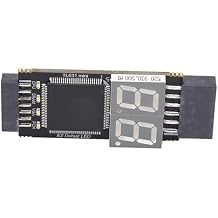
Motherboard Diagnostic Card PCIe LPC DEBUG Tester Kit with LED Indicator for Computer Repair and PC Hardware
Nº de artículo:
89731537
GTQ 299
Price Details
Excluding Shipping & Custom charges ( Shipping and custom charges will be calculated on checkout )
*All items will import from Estados Unidos
0 ratings
Escribe una opinión
En stock
 Importado de la tienda USA
QTY:
Haz tu pedido ahora y recíbelo por ahí Monday, Julio 27
Secured transaction
Ubuy works hard to protect your security and privacy. Our advanced payment security system ensures confidentiality by encrypting your information during transmission using AES (Advanced Encryption Standards) and SSL (Secure Socket Layer) protocols. Your payment details are 100% secure as we do not share your payment details with third party sellers.
Our Top Logistics Partners


This motherboard diagnostic card offers strong compatibility and high performance, featuring multiple LED indicators for comprehensive diagnostics.

Fast
Shipping

Free
Return*

Secure Packaging

100% Original Products

PCI DSS Compliance

ISO 27001 Certified


What Stands Out
LED Diagnostic Indicators
Provides real-time visual feedback on motherboard diagnostics with LED lights, allowing quick identification of errors and issues without needing to power on the system.
Versatile Compatibility
Supports multiple interface protocols including PCIe, LPC, and Serial Comm, making it suitable for a wide range of motherboard types and ensuring comprehensive testing options.
User-Friendly Interface
Designed with intuitive operation in mind, the diagnostic tester allows users to easily monitor performance and troubleshoot problems, making it ideal for both enthusiasts and professional technicians.
Detalles de producto
| Item Weight | 0.5 lbs (230 grams) |
Who Should Buy?

-
System Builders
Ideal for enthusiasts building custom PCs needing to troubleshoot and diagnose motherboard issues efficiently.
-
IT Professionals
Valuable for technicians diagnosing hardware problems in high-performance systems or during system upgrades and maintenance.
-
Hardware Developers
Useful for developers testing motherboard designs and ensuring compliance with communication protocols like PCIe and LPC.

-
Casual Users
Not suitable for everyday users with basic computer knowledge who require simple solutions and may find it complex.
DESCRIPCIÓN DEL PRODUCTO
Motherboard Diagnostic Card PCIe LPC DEBUG Tester Kit with LED Indicator for Computer Repair and PC Hardware
¿Tienes alguna consulta? Chatea con nosotros
Preguntas y respuestas de los clientes
-
Pregunta:
What is the purpose of the FTVOGUE Motherboard Diagnostic Card?
Respuesta: The FTVOGUE Motherboard Diagnostic Card is designed to troubleshoot and diagnose issues on a motherboard. It provides real-time data about boot errors and other performance metrics through its LED indicators. By displaying error codes associated with system failures, it helps users identify the exact problem, allowing for quicker troubleshooting and repairs. For example, if you're experiencing boot failures, simply plugging this card into a PCIe or LPC slot can quickly reveal the associated error code. -
Pregunta:
What types of connection interfaces does the FTVOGUE Diagnostic Card support?
Respuesta: The FTVOGUE Motherboard Diagnostic Card supports various connection interfaces including PCIe, LPC, and UART1. This versatility makes it compatible with a wide range of motherboards, whether you're dealing with legacy systems or modern configurations. By accommodating serial communication protocols, this diagnostic tool is invaluable for technicians and hobbyists alike who need to tackle different motherboard types. For instance, motherboard testing for gaming rigs or older PCs can be streamlined through its compatible interfaces. -
Pregunta:
How can I interpret the error codes displayed by the FTVOGUE Diagnostic Card?
Respuesta: The FTVOGUE Diagnostic Card comes with a detailed chart for interpreting LED error codes, which helps users understand the nature of the problem. Each code corresponds to specific hardware or software failures, and knowing how to read them can save a lot of time during troubleshooting. You can consult the included documentation or online resources for a comprehensive list of error codes and their meanings. This knowledge aids both DIYers and professional technicians in rapidly diagnosing faults, ensuring that repairs are targeted and effective. -
Pregunta:
Can beginners use the FTVOGUE Motherboard Diagnostic Card?
Respuesta: Absolutely! The FTVOGUE Motherboard Diagnostic Card is designed for both seasoned professionals and beginners. Its intuitive interface, along with clear LED indicators and error codes, allows even those with limited technical knowledge to perform diagnostics effectively. Users can learn through hands-on experience without needing extensive training. This makes it ideal for hobbyists building their first PC or for students in learning environments where practical skills are emphasized. -
Pregunta:
Is the FTVOGUE Diagnostic Card suitable for all computer brands?
Respuesta: Yes, the FTVOGUE Motherboard Diagnostic Card is compatible with a wide range of computer brands as it supports both standard PCIe and LPC connections. This adaptability means that regardless of whether you are using a custom-built rig, a pre-assembled desktop, or older models, this diagnostic tool can effectively interface with numerous motherboards. Whether you're troubleshooting a Dell, HP, or a custom gaming setup, this card is a versatile addition to your toolkit. -
Pregunta:
How does the LED indicator work on the FTVOGUE Diagnostic Card?
Respuesta: The LED indicator on the FTVOGUE Diagnostic Card lights up to signify various states of system health and error codes. Different colors or patterns correspond to specific diagnostic messages, providing instant visual feedback. This makes it easy for users to quickly identify issues without needing to boot into the operating system. For example, a blinking light may indicate a communication error, while a steady light could suggest a complete system failure. This feature significantly enhances troubleshooting efficiency. -
Pregunta:
What are the typical applications for using the FTVOGUE Diagnostic Card?
Respuesta: The FTVOGUE Motherboard Diagnostic Card is widely used for various applications including system building, repairs, and education. Technicians use it to diagnose hardware failures in repair shops, while hobbyists employ it during DIY build projects. Additionally, it serves as a learning tool in educational settings, helping students understand motherboard diagnostics and error codes. Such versatility makes it indispensable for anyone working with computer hardware, from seasoned professionals to curious learners. -
Pregunta:
Can the FTVOGUE Diagnostic Card help in overclocking scenarios?
Respuesta: While the primary function of the FTVOGUE Motherboard Diagnostic Card is to diagnose errors, it can also aid in overclocking scenarios by providing real-time feedback on system stability. When pushing hardware limits, having a tool that displays error codes can help users quickly identify any instability or failures. This can prevent potentially damaging issues during the overclocking process, ensuring all components remain in optimal working condition. -
Pregunta:
What troubleshooting tips can I use with the FTVOGUE Diagnostic Card?
Respuesta: To effectively utilize the FTVOGUE Motherboard Diagnostic Card for troubleshooting, start by ensuring it’s properly seated in the PCIe or LPC slot. Then, pay attention to the LED indicators when powering on the system, as these will illuminate error codes. If problems persist, refer to the manual for specific troubleshooting methods related to the codes displayed. Also, keep your BIOS updated and check hardware connections for loose cables to avoid errors unrelated to the motherboard. -
Pregunta:
Where can I buy the FTVOGUE Motherboard Diagnostic Card in Guatemala?
Respuesta: You can conveniently purchase the FTVOGUE Motherboard Diagnostic Card from Ubuy in Guatemala. Ubuy offers a reliable shopping experience with a wide selection of tech products. Their platform allows you to easily find and order the diagnostic card along with a multitude of other electronic accessories, ensuring that you can efficiently enhance your computing hardware toolkit.
FTVOGUE Motherboards Editorial Review
No se encontraron reseñas editoriales
Customer Reviews & Ratings
1 valoraciones de los clientes
-
5 estrella
100%
-
4 estrella
0%
-
3 estrella
0%
-
2 estrella
0%
-
1 estrella
0%
Revisar este producto
Comparte tus ideas con otros clientes
Platform Trust & Buyer Confidence

MT
Mohd
Verified buyer
“The product received very good packaging & safe…Thank You”
16 June 2026 · via Trustpilot
SJ
Shawati
Verified buyer
“Accurate delivery timing given”
16 June 2026 · via Trustpilot
YB
Youcef
Verified buyer
“Not madly expensive like I thought, and much quicker than promised.”
15 June 2026 · via Trustpilot
LM
Leila
Verified buyer
“Never dealt with Ubuy before, but everything worked out great. Seamless cross border purchasing and shipping. Thanks!”
6/7/2026 · via Trustpilot
KA
Kwame
Verified buyer
“The process was smooth, with clear communication and timelines. This was my 1st purchase and I am really impressed. I will definitely be coming back.”
12 June 2026 · via Trustpilot
Pago seguro
Global Delivery
Easy Returns
Genuine Products
Product Price History
Información importante
- Limitaciones: Para los productos enviados al extranjero, ten en cuenta que cualquier garantía del fabricante puede no ser válida; las opciones de servicio del fabricante pueden no estar disponibles; los manuales del producto, las instrucciones y las advertencias de seguridad pueden no estar en los idiomas del país de destino; los productos (y los materiales que los acompañan) pueden no estar diseñados de acuerdo con las normas, especificaciones y requisitos de etiquetado del país de destino; y los productos pueden no ajustarse al voltaje del país de destino y a otras normas eléctricas (lo que requiere el uso de un adaptador o convertidor, si procede). El destinatario es responsable de asegurarse de que el producto puede ser importado legalmente al país de destino. Cuando hagas un pedido a Ubuy o a sus filiales, el destinatario es el importador registrado y debe cumplir todas las leyes y normativas del país de destino.
- No todos los productos que aparecen en Ubuy están a la venta, ya que Ubuy es un motor de búsqueda a nivel mundial. Los productos están sujetos a las normas de exportación/comercio.
GTQ 299
Haz tu pedido ahora y recíbelo por ahí Monday, Julio 27
This item is not restrict in my country.(Please click on above link if this item is not restrict in your country, So our team will review and allow.)
QTY:
Secured transaction
PCI DSS compliant and ISO 27001:2022 certified, with encrypted payments and full buyer protection on every order.
Our Top Logistics Partners
Fastest cross-border delivery
características y beneficios
- Strong compatibility with various interfaces: PCI E, mini PCI E, LPC.
- High recognition rate with automatic power module recognition.
- Multi-channel support with LED indicators for real-time status check.
- Includes all necessary tools for quick and easy connections.
- Efficient diagnostics for CPU, memory, VGA, and Southbridge modules.
- Stable performance ensuring reliable operation across systems.
Ubuy Assurance
Experience worry-free shopping with 100% original products, PCI DSS-compliant payment security, ISO 27001-certified data protection, the fastest cross-border delivery, free returns *, and secure packaging on every order.