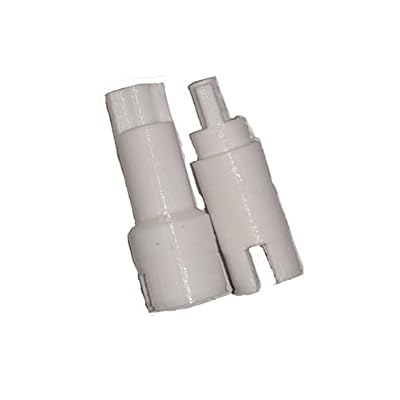
Page Separation Roller shafts for Epson Workforce DS-510560 scanners
Replacement roller shafts for Epson DS-510 and DS-560 scanners to prevent paper jams and clicking noise
Page Separation Roller shafts for Epson Workforce DS-510560 scanners

Page Separation Roller shafts for Epson Workforce DS-510560 scanners

Sin existencias
Estados Unidos Importado de la tienda USA
Our Top Logistics Partners
  • fedex
  • dhl
Replacement roller shafts for Epson DS-510 and DS-560 scanners to prevent paper jams and clicking noise
Garantía U-Care:
Ninguno
Selecciona un plan
fast shipping

Fast
Shipping

free return

Free
Return*

secure packaging

Secure Packaging

100% original products

100% Original Products

pci-dss

PCI DSS Compliance

iso certified

ISO 27001 Certified


paypal payment
visa payment
mastercard payment

What Stands Out

Precision Engineering
These roller shafts are designed with precision to ensure smooth paper feeding, minimizing jams and improving overall scanning efficiency for the Epson Workforce DS-510/560 models.
Durable Material
Constructed from high-quality, durable materials, these roller shafts provide long-lasting performance, ensuring your scanner operates optimally without frequent replacements or maintenance expenses.
Easy Installation
Designed for user-friendly installation, these roller shafts allow for quick replacement, reducing downtime and enabling users to get back to scanning tasks promptly and efficiently.

Detalles de producto

Shop the best selection of high-quality Page Separation Roller Shafts for Epson Workforce DS-510560 Scanners at Ubuy Guatemala. Get fast shipping and great prices on all your scanner needs.
  • Replacement page separation roller shafts for Epson Workforce DS-510 and DS-560 scanners
  • Designed to fix scanner jams and clicking noise when feeding multiple pages
  • May be compatible with other scanners in the same series
  • Confirm fitment specifically for DS-510 and DS-560 models
  • Essential parts for maintaining the functionality of the scanner
  • Ensure smooth and efficient document scanning with these replacement shafts
Scanner TypeDocument
Resolution600 dpi
Paper SizeLetter, Legal
Optical Sensor TechnologyCIS
Item Weight1 Ounces (28.35 grams)
Minimum System RequirementsWindows 7
BrandGeneric
UPC689354582747
ManufacturerEpsonScannerRepair
Sheet SizeLetter, Legal

Who Should Buy?

Suitable For
  • Frequent Scanners

    Ideal for users who scan documents regularly and require consistent, reliable performance from their scanning hardware.

  • Office Environments

    Perfect for office settings where document management is essential and efficiency in scanning processes is prioritized.

  • Cost-Conscious Users

    Beneficial for budget-minded individuals or businesses looking to maintain equipment without the cost of replacement scanners.

Not Suitable For
  • Low Volume Users

    Not suitable for users who rarely scan and may not need to invest in replacement parts for their scanners.

DESCRIPCIÓN DEL PRODUCTO

Page Separation Roller shafts for Epson Workforce DS-510560 scanners

¿Tienes alguna consulta? Chatea con nosotros

Preguntas y respuestas de los clientes

  • Pregunta: What are Page Separation Roller shafts and why are they important for Epson Workforce DS-510560 scanners?

    Respuesta: Page Separation Roller shafts are crucial components in document scanners like the Epson Workforce DS-510560. They ensure that pages are fed through the scanner one at a time, preventing jams and misfeeds. This is important for maintaining efficient and accurate scanning, especially for large documents or stacks of papers. If this component is worn out or damaged, you may experience frequent paper jams, degraded scanning performance, and an increased risk of damaging your documents.
  • Pregunta: What symptoms indicate a need to replace the Page Separation Roller shafts in my scanner?

    Respuesta: If you notice frequent paper jams, misfeeds, or unclear scans, it may be time to replace the Page Separation Roller shafts. Other signs include unusual noises during operation or inconsistent feeding of documents. These symptoms not only lead to frustrating scanning experiences but can also impact the quality of your digitized documents. Addressing these issues promptly through replacement of the roller shafts can enhance the overall scanning performance of your Epson Workforce DS-510560.
  • Pregunta: Can I install the Page Separation Roller shafts myself, or should I seek professional help?

    Respuesta: You can typically install Page Separation Roller shafts yourself if you have basic technical skills and follow the manufacturer’s guidelines. Many users find step-by-step tutorial videos helpful in navigating the replacement process. However, if you're uncomfortable with DIY repairs or lack the right tools, consulting a professional technician ensures a successful and safe installation, preventing possible damage to your scanner.
  • Pregunta: How does the quality of replacement Page Separation Roller shafts impact my scanning experience?

    Respuesta: Using high-quality replacement Page Separation Roller shafts can significantly enhance your scanning experience. They help maintain the consistent feed of paper, ensuring fewer jams and clear scans. Quality parts are designed to fit perfectly, delivering reliable performance over time. On the other hand, low-quality parts might lead to additional jams and inconsistent performance, negating the advantages of your scanner. It’s advisable to invest in reputable replacements to ensure durability.
  • Pregunta: Where can I buy Page Separation Roller shafts for my Epson Workforce DS-510560 scanner?

    Respuesta: You can buy Page Separation Roller shafts for your Epson Workforce DS-510560 scanner through Ubuy. Ubuy offers a wide selection of replacement parts for various scanner models, ensuring you find the correct components. They make purchasing straightforward by providing detailed product descriptions and customer reviews, helping you make informed decisions.
  • Pregunta: How often should I replace the Page Separation Roller shafts in my scanner?

    Respuesta: Replacement frequency for Page Separation Roller shafts depends on your scanning volume and usage patterns. If you frequently scan large batches of documents, you may need to replace the roller shafts more often. Regular inspections for wear and tear can guide you; if you notice performance declines such as jams or feeding issues, it may be time for a replacement. Timely replacement can help maintain the efficiency and longevity of your scanner.
  • Pregunta: Are there different types of Page Separation Roller shafts for the Epson Workforce DS-510560?

    Respuesta: While there are various brands producing Page Separation Roller shafts compatible with the Epson Workforce DS-510560, compatibility should be a priority to ensure proper function. It’s crucial to check specifications or consult customer service when selecting replacement rollers to avoid purchasing the wrong type, which could lead to further issues down the road. Choose parts that meet the manufacturer’s standards for optimal performance.
  • Pregunta: What maintenance tips can help prolong the life of my scanner’s Page Separation Roller shafts?

    Respuesta: To prolong the life of your scanner’s Page Separation Roller shafts, regular cleaning and maintenance are key. Dust and debris can accumulate on these parts, affecting performance. Use a soft cloth or appropriate cleaning product to keep the rollers clean. Additionally, avoid excessive force when inserting documents and ensure paper is loaded properly. These practices can help maintain optimum scanning performance and reduce the frequency of replacements.
  • Pregunta: What impact do damaged Page Separation Roller shafts have on the overall functionality of the scanner?

    Respuesta: Damaged Page Separation Roller shafts can significantly disrupt the functionality of your scanner. They often lead to increased paper jams, inconsistent feeding, and even potential damage to documents being scanned. This not only frustrates users but can also slow down productivity in environments relying heavily on efficient document management. Thus, to ensure smooth operation and avoid costly setbacks, it's important to address any damage to these components promptly.
  • Pregunta: How do I know if I’ve chosen the correct replacement Page Separation Roller shafts for my scanner?

    Respuesta: To ensure you've chosen the correct replacement Page Separation Roller shafts for your Epson Workforce DS-510560, verify compatibility by checking product descriptions and specifications provided by the seller. Look for compatibility lists or user reviews to affirm that the parts fit your scanner model. Additionally, comparing the new part against the original can help ascertain that you have selected the right replacement, ensuring seamless functionality.

Accessories Editorial Review

No se encontraron reseñas editoriales

Customer Reviews & Ratings

5.0
1 valoraciones de los clientes
  • 5 estrella
    100%
  • 4 estrella
    0%
  • 3 estrella
    0%
  • 2 estrella
    0%
  • 1 estrella
    0%

Revisar este producto

Comparte tus ideas con otros clientes

Platform Trust & Buyer Confidence

trustpilot logo
4.3/5 9,000 + reviews
Read reviews
MT
Mohd
Verified buyer

“The product received very good packaging & safe…Thank You”

16 June 2026 · via Trustpilot
SJ
Shawati
Verified buyer

“Accurate delivery timing given”

16 June 2026 · via Trustpilot
YB
Youcef
Verified buyer

“Not madly expensive like I thought, and much quicker than promised.”

15 June 2026 · via Trustpilot
LM
Leila
Verified buyer

“Never dealt with Ubuy before, but everything worked out great. Seamless cross border purchasing and shipping. Thanks!”

6/7/2026 · via Trustpilot
KA
Kwame
Verified buyer

“The process was smooth, with clear communication and timelines. This was my 1st purchase and I am really impressed. I will definitely be coming back.”

12 June 2026 · via Trustpilot
Pago seguro Global Delivery Easy Returns Genuine Products

Información importante

  • Limitaciones: Para los productos enviados al extranjero, ten en cuenta que cualquier garantía del fabricante puede no ser válida; las opciones de servicio del fabricante pueden no estar disponibles; los manuales del producto, las instrucciones y las advertencias de seguridad pueden no estar en los idiomas del país de destino; los productos (y los materiales que los acompañan) pueden no estar diseñados de acuerdo con las normas, especificaciones y requisitos de etiquetado del país de destino; y los productos pueden no ajustarse al voltaje del país de destino y a otras normas eléctricas (lo que requiere el uso de un adaptador o convertidor, si procede). El destinatario es responsable de asegurarse de que el producto puede ser importado legalmente al país de destino. Cuando hagas un pedido a Ubuy o a sus filiales, el destinatario es el importador registrado y debe cumplir todas las leyes y normativas del país de destino.
  • No todos los productos que aparecen en Ubuy están a la venta, ya que Ubuy es un motor de búsqueda a nivel mundial. Los productos están sujetos a las normas de exportación/comercio.