0 ratings




Nº de artículo:
19950663
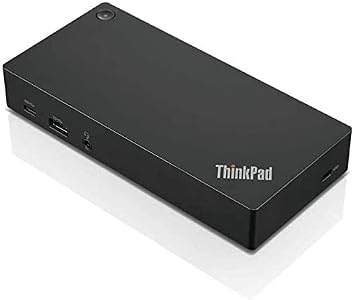
Lenovo ThinkPad USB-C Dock Gen 2 (40AS0090)
Nº de artículo:
19950663
GTQ 1298
Price Details
Excluding Shipping & Custom charges ( Shipping and custom charges will be calculated on checkout )
*All items will import from Estados Unidos
En stock
 Importado de la tienda USA
QTY:
Haz tu pedido ahora y recíbelo por ahí Viernes, Julio 24
Secured transaction
Ubuy works hard to protect your security and privacy. Our advanced payment security system ensures confidentiality by encrypting your information during transmission using AES (Advanced Encryption Standards) and SSL (Secure Socket Layer) protocols. Your payment details are 100% secure as we do not share your payment details with third party sellers.
Our Top Logistics Partners


Why settle for ordinary when the right tools can take you to the next level? Like the ThinkPad USB-C Dock Gen 2

Fast
Shipping

Free
Return*

Secure Packaging

100% Original Products

PCI DSS Compliance

ISO 27001 Certified


What Stands Out
Multiple Connectivity Options
The Lenovo ThinkPad USB-C Dock Gen 2 provides multiple ports, including USB, HDMI, and Ethernet, allowing seamless connection to various devices and enhancing productivity for both home and office environments.
High-Resolution Support
With support for dual 4K displays, this dock enables users to expand their visual workspace, making it perfect for professionals needing detailed graphics or multitasking capabilities.
Compact and Portable
Designed with portability in mind, this dock is lightweight and easy to carry, providing users with a versatile solution to connect their devices wherever they work.
Detalles de producto
- Next generation USB-C docking solution
- Supports vivid 4K displays or multiple 1080p screens
- Transfer USB data at rapid 10Gbps speeds
- Stable wired network connection
- Ideal for controlling ThinkPad systems
- Supports DisplayPort 1.4 and HDMI 2.0 for max 1 x 4K @ 60Hz display
| Hardware Interface | HDMI, USB |
| Compatible Devices | lenovo Notebooks/Tablet PC |
| Total Usb Ports | 3 |
| Number of Ports | 2 |
| Total Number of HDMI Ports | 1 |
| Wattage | 90 watts |
| Smart Home Compatibility | Not Smart Home Compatible |
| Item Dimensions L x W x H | 6.73"L x 3.15"W x 1.18"H (17.1 x 8 x 3 cm) |
| Item Weight | 11.5 Ounces (326.03 grams) |
| Color | Black, Orange |
| EU Spare Part Availability Duration | 3 Years |
| Brand | Lenovo |
| UPC | 193124916378 |
| Manufacturer | Lenovo |
| Model Number | 40AS0090JP |
| Mfr Part Number | 03X7609 |
| Unit Count | 1.0 Count |
| Total USB Ports | 3 |
| Product Dimensions (L x W x H) | 6.73"L x 3.15"W x 1.18"H (17.1 x 8 x 3 cm) |
| Total HDMI Ports | 1 |
| Package Weight | 2.2 Pound |
Who Should Buy?

-
Business Professionals
Perfect for business users needing multiple ports for presentations, connecting multiple monitors, and enhancing productivity on-the-go.
-
Remote Workers
Ideal for remote employees who require a versatile docking station to smoothly connect various devices and peripherals.
-
Gamers
Great for gamers who want to expand their setup with multiple displays, ensuring seamless gaming and multitasking.

-
Casual Users
Not ideal for casual users who only need basic connectivity without multiple monitor setups or extra ports.
-
Budget-Conscious Buyers
May not suit budget buyers as it offers premium features at a higher price point compared to simpler docks.
-
Mac Users
Some functionality may be limited for Mac users, as the dock is optimized primarily for Lenovo and Windows systems.
DESCRIPCIÓN DEL PRODUCTO
¿Tienes alguna consulta? Chatea con nosotros
Preguntas y respuestas de los clientes
-
Pregunta:
What devices are compatible with the Lenovo ThinkPad USB-C Dock Gen 2?
Respuesta: The Lenovo ThinkPad USB-C Dock Gen 2 is compatible with a wide range of laptops and devices that support USB-C connectivity. This includes various Lenovo ThinkPad models as well as other USB-C enabled devices. The dock expands your laptop’s capabilities, allowing you to connect to multiple displays, peripherals, and networks seamlessly. It's particularly useful for professionals who utilize multiple monitors and need extra USB ports for connecting keyboards, mice, and external drives. -
Pregunta:
How many monitors can be connected to the Lenovo ThinkPad USB-C Dock Gen 2?
Respuesta: You can connect up to two 4K monitors or three FHD monitors simultaneously using the Lenovo ThinkPad USB-C Dock Gen 2. This allows for a highly productive workspace setup, ideal for multitasking in both professional environments and creative work. Notably, the dock enables extended displays, providing users with more screen real estate for applications such as video editing, data analysis, and presentations. -
Pregunta:
Does the Lenovo ThinkPad USB-C Dock Gen 2 provide power delivery?
Respuesta: Yes, the Lenovo ThinkPad USB-C Dock Gen 2 supports power delivery, allowing you to charge your laptop while using the dock. This feature simplifies your workspace by reducing cord clutter, as you only need one cable to connect your laptop to the connections of the dock. It's particularly beneficial for users who are often on the go, as it lets you plug in and out quickly while maintaining power to your device. -
Pregunta:
What types of ports are available on the Lenovo ThinkPad USB-C Dock Gen 2?
Respuesta: The Lenovo ThinkPad USB-C Dock Gen 2 includes an array of ports, comprising USB-A, USB-C, HDMI, DisplayPort, Ethernet, and a combo audio jack. This variety ensures compatibility with numerous devices and peripherals, allowing easy connection to mice, keyboards, printers, and enterprise networks. Users in a corporate setting can benefit from quick and efficient connectivity options when transitioning their laptop to a desk setup. -
Pregunta:
Is the Lenovo ThinkPad USB-C Dock Gen 2 suitable for gaming?
Respuesta: While the Lenovo ThinkPad USB-C Dock Gen 2 is primarily designed for productivity and business purposes, it can be used for light gaming on modern laptops equipped with compatible hardware. Though it may not offer the same performance as dedicated gaming docks, it enhances your gaming experience by allowing multi-display setups. For more casual gaming sessions, connecting a good gaming mouse and external display can provide a better interface than relying solely on a laptop screen. -
Pregunta:
Can I use the Lenovo ThinkPad USB-C Dock Gen 2 with my MacBook?
Respuesta: Yes, the Lenovo ThinkPad USB-C Dock Gen 2 can be used with MacBook models that support USB-C connections. This dock provides additional USB ports and display outputs that can enhance your MacBook's functionality. MacBook users can experience improved multitasking by connecting multiple peripherals like external hard drives, webcams, and keyboards, thus expanding their capabilities at work or home. -
Pregunta:
How do I set up the Lenovo ThinkPad USB-C Dock Gen 2?
Respuesta: Setting up the Lenovo ThinkPad USB-C Dock Gen 2 is straightforward. Simply connect the USB-C cable from the dock to your laptop. Next, plug in any external monitors using the available HDMI or DisplayPort options, and connect any other peripheral devices to the appropriate USB ports. Once connected, your laptop will automatically recognize peripherals, enabling you to start working right away. This seamless setup process saves time and enhances productivity. -
Pregunta:
What is the maximum data transfer speed of the Lenovo ThinkPad USB-C Dock Gen 2?
Respuesta: The Lenovo ThinkPad USB-C Dock Gen 2 supports a maximum data transfer speed of up to 10 Gbps on its USB-C and USB-A ports. This high-speed transfer is ideal for users who frequently move large files between their laptops and external storage devices. Whether you’re transferring video footage for editing or backing up essential documents, the dock ensures efficiency without bottlenecks in data flow. -
Pregunta:
Does the Lenovo ThinkPad USB-C Dock Gen 2 come with any included software?
Respuesta: The Lenovo ThinkPad USB-C Dock Gen 2 does not require specific software to function. It is a plug-and-play device that works seamlessly with both Windows and macOS operating systems. However, Lenovo offers additional management software for users who need to customize their dock settings or updates. This functionality is particularly useful in corporate environments where IT departments manage multiple devices and configurations. -
Pregunta:
Where can I buy Lenovo ThinkPad USB-C Dock Gen 2 40AS0090?
Respuesta: You can buy the Lenovo ThinkPad USB-C Dock Gen 2 40AS0090 from Ubuy in Guatemala. Ubuy offers a reliable platform to purchase this product, ensuring that you can easily find it along with related accessories. It’s a great option for anyone looking to enhance their laptop's connectivity and capabilities through a dependable online store.
Lenovo Docking Stations 40AS0090JP Editorial Review


No se encontraron reseñas editoriales
Customer Reviews & Ratings
521 valoraciones de los clientes
-
5 estrella
60%
-
4 estrella
10%
-
3 estrella
8%
-
2 estrella
4%
-
1 estrella
18%
Revisar este producto
Comparte tus ideas con otros clientes
Platform Trust & Buyer Confidence

MT
Mohd
Verified buyer
“The product received very good packaging & safe…Thank You”
16 June 2026 · via Trustpilot
SJ
Shawati
Verified buyer
“Accurate delivery timing given”
16 June 2026 · via Trustpilot
YB
Youcef
Verified buyer
“Not madly expensive like I thought, and much quicker than promised.”
15 June 2026 · via Trustpilot
LM
Leila
Verified buyer
“Never dealt with Ubuy before, but everything worked out great. Seamless cross border purchasing and shipping. Thanks!”
6/7/2026 · via Trustpilot
KA
Kwame
Verified buyer
“The process was smooth, with clear communication and timelines. This was my 1st purchase and I am really impressed. I will definitely be coming back.”
12 June 2026 · via Trustpilot
Pago seguro
Global Delivery
Easy Returns
Genuine Products
People also bought these Items


Product Price History
Información importante
- Limitaciones: Para los productos enviados al extranjero, ten en cuenta que cualquier garantía del fabricante puede no ser válida; las opciones de servicio del fabricante pueden no estar disponibles; los manuales del producto, las instrucciones y las advertencias de seguridad pueden no estar en los idiomas del país de destino; los productos (y los materiales que los acompañan) pueden no estar diseñados de acuerdo con las normas, especificaciones y requisitos de etiquetado del país de destino; y los productos pueden no ajustarse al voltaje del país de destino y a otras normas eléctricas (lo que requiere el uso de un adaptador o convertidor, si procede). El destinatario es responsable de asegurarse de que el producto puede ser importado legalmente al país de destino. Cuando hagas un pedido a Ubuy o a sus filiales, el destinatario es el importador registrado y debe cumplir todas las leyes y normativas del país de destino.
- No todos los productos que aparecen en Ubuy están a la venta, ya que Ubuy es un motor de búsqueda a nivel mundial. Los productos están sujetos a las normas de exportación/comercio.
GTQ 1298
Haz tu pedido ahora y recíbelo por ahí Viernes, Julio 24
This item is not restrict in my country.(Please click on above link if this item is not restrict in your country, So our team will review and allow.)
QTY:
Secured transaction
PCI DSS compliant and ISO 27001:2022 certified, with encrypted payments and full buyer protection on every order.
Our Top Logistics Partners
Fastest cross-border delivery
características y beneficios
- Next generation USB-C docking solution for a stress-free wired network connection
- Experience vivid 4K on a single screen or multitask with multiple displays
- Control ThinkPad systems with PXE Boot, System Wake-on-LAN and passing MAC address through dock
- Supports DisplayPort 1.4 and HDMI 2.0 for max 1 x 4K@60Hz display
- One connection for all peripherals with lightning-fast 10 Gbps speeds
- Eliminates limitations and increases productivity
Ubuy Assurance
Experience worry-free shopping with 100% original products, PCI DSS-compliant payment security, ISO 27001-certified data protection, the fastest cross-border delivery, free returns *, and secure packaging on every order.