0 ratings

Nº de artículo:
22657145
Microsoft Surface Dock
Nº de artículo:
22657145
GTQ 728
Price Details
Excluding Shipping & Custom charges ( Shipping and custom charges will be calculated on checkout )
*All items will import from Estados Unidos
0 ratings
Escribe una opinión
En stock
 Importado de la tienda USA
QTY:
Haz tu pedido ahora y recíbelo por ahí Sábado, Agosto 22
Secured transaction
Ubuy works hard to protect your security and privacy. Our advanced payment security system ensures confidentiality by encrypting your information during transmission using AES (Advanced Encryption Standards) and SSL (Secure Socket Layer) protocols. Your payment details are 100% secure as we do not share your payment details with third party sellers.
Our Top Logistics Partners


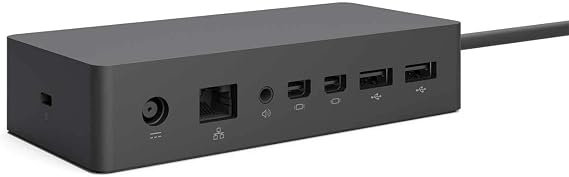
All the ports you need - with two high-definition video ports, a gigabit Ethernet port, four high-speed USB 3.0 ports and an audio output

Fast
Shipping

Free
Return*

Secure Packaging

100% Original Products

PCI DSS Compliance

ISO 27001 Certified


What Stands Out
Versatile Connectivity
The Microsoft Surface Dock offers numerous ports, including USB-C and USB-A, ensuring seamless connectivity with multiple devices, enhancing productivity in any workspace.
High-Speed Data Transfer
With Thunderbolt 3 compatibility, the dock enables rapid data transfer and high-resolution video output, significantly improving the efficiency of data-heavy tasks.
Power Delivery
The dock provides power delivery to charge your Surface device while in use, eliminating the need for multiple power adapters and simplifying your workspace setup.
Detalles de producto
- Includes all the ports you need for your Microsoft Surface device
- Features two high-definition video ports for enhanced display quality
- Gigabit Ethernet port for faster internet connectivity
- Four high-speed USB 3.0 ports for quick data transfer
- Audio output for connecting headphones or speakers
- Minimalist design and easy setup using Surface Connect technology
| Hardware Interface | Ethernet, USB 3.0 |
| Compatible Devices | Microsoft Surface Pro 3 |
| Total Usb Ports | 4 |
| Number of Ports | 4 |
| Item Dimensions L x W x H | 5.12"L x 2.36"W x 1.18"H (13 x 6 x 3 cm) |
| Item Weight | 550 Grams |
| Color | Black |
| Brand | Microsoft |
| Global Trade Identification Number | 00885370996425, 00889842013771 |
| UPC | 885370996425 889842013771 |
| Manufacturer | Microsoft |
| Model Number | PD9-00011 |
| Mfr Part Number | 1661 |
| Unit Count | 1.0 Count |
| Total USB Ports | 4 |
| Product Dimensions (L x W x H) | 5.12"L x 2.36"W x 1.18"H (13 x 6 x 3 cm) |
| Number of Items | 1 |
Who Should Buy?

-
Remote Workers
Ideal for remote workers needing multiple ports to connect monitors, keyboards, and other peripherals for productivity.
-
Creative Professionals
Great for designers and video editors requiring high-resolution monitors and quick data transfer speeds for their projects.
-
Business Users
Suitable for business environments integrating Surface devices with existing office setups using various connections and docking capabilities.

-
Casual Users
Casual users who only require minimal connectivity options may find the dock unnecessary and overly complex.
DESCRIPCIÓN DEL PRODUCTO
Microsoft Surface Dock
About This Item
Enhance your Microsoft Surface experience with the Microsoft 1661 Surface Dock. This docking station is designed to elevate your productivity by providing a seamless connection between your Surface device and multiple peripherals. The Microsoft 1661 Surface Dock features a sturdy and compact design that makes it easy to set up and use. Simply connect your Surface device to the dock and instantly expand its capabilities.
With a single connection, you can connect to two high-definition monitors, a full-sized keyboard, a mouse, and more. Experience the convenience of a versatile workstation with the Microsoft 1661 Surface Dock. It offers a variety of ports to meet all your connectivity needs. With two high-definition video ports, a Gigabit Ethernet port, four USB 3.0 ports, an audio output, and an audio input, you'll never have to worry about running out of connectivity options. The Microsoft 1661 Surface Dock is designed to be compatible with Microsoft Surface Pro, Surface Pro 3, Surface Pro 4, and Surface Book.
It's the perfect accessory for professionals, students, and anyone who needs to streamline their workflow. Take your productivity to the next level with the Microsoft 1661 Surface Dock. Upgrade your Surface device today and unlock its full potential.
¿Tienes alguna consulta? Chatea con nosotros
Preguntas y respuestas de los clientes
-
Pregunta:
What is the Microsoft Surface Dock used for?
Respuesta: The Microsoft Surface Dock is designed to expand the capabilities of Surface devices, converting them into desktop workstations. It connects your Surface device to multiple external monitors, USB peripherals, and an Ethernet connection, streamlining your workspace. It’s ideal for users who require a dual-monitor setup for productivity, or who benefit from connecting additional devices, such as printers or external storage, enhancing both performance and usability. -
Pregunta:
What ports are available on the Microsoft Surface Dock?
Respuesta: The Microsoft Surface Dock comes equipped with multiple ports, including two Mini DisplayPorts, four USB 3.0 ports, and an Ethernet port. This variety allows users to connect various devices simultaneously. For instance, you can connect two monitors for a more efficient workflow, as well as other devices like keyboards, mice, and external drives. This expansion capability is essential for users needing maximum connectivity in a cohesive workspace. -
Pregunta:
Does the Microsoft Surface Dock charge my Surface device?
Respuesta: Yes, the Microsoft Surface Dock is capable of charging your Surface device while it is connected. This means you can keep your device powered without needing a separate power adapter. This is especially useful for professionals who need to ensure their devices remain charged throughout the day without interruptions during work. It simplifies the process of transitioning from mobile to desktop modes effortlessly. -
Pregunta:
Is the Microsoft Surface Dock compatible with all Surface models?
Respuesta: The Microsoft Surface Dock is primarily compatible with Surface Book, Surface Pro 3, Pro 4, Pro 5, Pro 6, Pro 7, and Surface Laptop models. However, it is not compatible with the original Surface or Surface 2. For users looking to maximize their Surface’s potential, verifying compatibility ensures you can take full advantage of the docking station's features, improving your productivity and workspace versatility. -
Pregunta:
How do I set up the Microsoft Surface Dock?
Respuesta: Setting up the Microsoft Surface Dock is a straightforward process. Simply plug the dock into a power source and connect your Surface device using the Surface Connect cable. From there, you can attach peripherals such as monitors and USB devices. Users benefit from a more organized and efficient workspace without wrestling with multiple cords or connections. Once set up, a seamless integration of your devices is achieved, perfect for both work and leisure. -
Pregunta:
Can I use the Microsoft Surface Dock with multiple displays?
Respuesta: Absolutely! The Microsoft Surface Dock can support dual monitors via its two Mini DisplayPorts. This feature allows users to enhance their productivity, particularly in creative fields or complex data analysis where real estate on screens is essential. For those who perform multitasking or require enhanced visual workspace for software applications, dual displays create a more efficient and organized environment. -
Pregunta:
What power requirements does the Microsoft Surface Dock have?
Respuesta: The Microsoft Surface Dock requires a power outlet to function properly. It is equipped with its own power supply that not only powers the dock but also charges your Surface device while connected. This feature is beneficial for users who spend significant time in front of their computers and want to eliminate interruptions due to low battery, making it an essential accessory for everyday use in office environments. -
Pregunta:
Can the Microsoft Surface Dock be used for gaming?
Respuesta: While primarily designed for professional productivity, the Microsoft Surface Dock can be utilized for gaming purposes too. If you connect compatible gaming peripherals and external monitors, it can enhance your gaming experience by providing a larger display and better input devices. Users looking to integrate their gaming setup with workstations can seamlessly switch between tasks without needing to disconnect and reconnect their devices, retaining an organized space. -
Pregunta:
What should I do if my Microsoft Surface Dock is not recognized?
Respuesta: If your Microsoft Surface Dock is not recognized, first ensure it's properly connected to a power source and your Surface device. Restart both your Surface device and the dock. If the issue persists, check for updates in the system settings for drivers or firmware. This problem can be frustrating but following these steps typically resolves connectivity issues, allowing users to return to their tasks without prolonged delays. -
Pregunta:
Where can I buy the Microsoft Surface Dock in Guatemala?
Respuesta: In Guatemala, you can buy the Microsoft Surface Dock from Ubuy. They offer a wide selection of electronic products, including accessories for your Surface devices, ensuring that you can find what you need conveniently online. Shopping through Ubuy provides a reliable option for acquiring genuine Microsoft products.
Microsoft Docking Stations PD9-00011 Editorial Review
The Microsoft Surface Dock has garnered a mixed but generally positive reception from users. Many customers appreciate the dock's sturdy build, noting its heavy weight and effective design that keeps it stable during device connection and disconnection. This quality, combined with its ability to connect multiple monitors and provide gigabit-speed Ethernet, makes it an attractive solution for those looking to enhance their workspace, particularly in office settings. Users frequently highlight the dock's functionality, with several reviewers noting its success in supporting multiple displays and adding valuable USB ports. However, some customers encountered issues, with reports of non-functional monitor connections leading to dissatisfaction. One user indicated the need for specific types of HDMI cables for optimal performance, emphasizing a potential learning curve for those less tech-savvy. Overall, while there are sporadic complaints regarding connectivity issues, many users find the dock to be a worthwhile addition to their Surface devices, especially for its stability and ability to expand functionality. **
Customer Reviews & Ratings
1 valoraciones de los clientes
-
5 estrella
100%
-
4 estrella
0%
-
3 estrella
0%
-
2 estrella
0%
-
1 estrella
0%
Revisar este producto
Comparte tus ideas con otros clientes
ventajas
- Sturdy and stable design
- Enables connection of multiple monitors
- Provides additional USB ports
- Suitable for wired Ethernet connections
Contras
- Potential need for specific cables to achieve desired functionality
Platform Trust & Buyer Confidence

MA
Mohammad
Verified buyer
“Excellent quality and original too,when ubuy send original things I will appreciate that ,I very satisfied thank you”
23 July 2026 · via Trustpilot
CK
Chitra
Verified buyer
“The order and delivery progress was communicated very well. Package arrived within the estimated time. Products arrived as expected in good condition.”
22-Jul-26 · via Trustpilot
K
kund
Verified buyer
“Good supply of products. Safe payment methods, and shipment worldwide! Genuine products.”
23-Jul-26 · via Trustpilot
OO
Onesi
Verified buyer
“Was my first time buying a product from Ubuy, but I found it so helpful. This is reliable. Gonna place a new order!”
22 July 2026 · via Trustpilot
SJ
SAO JOHN
Verified buyer
“Ubuy is a great online platform to buy stuff. Reliable, fast delivery time and great value for money. I've been using Ubuy online shopping platform for three years now and will continue to do so.”
23 July 2026 · via Trustpilot
Pago seguro
Global Delivery
Easy Returns
Genuine Products
Product Price History
Información importante
- Limitaciones: Para los productos enviados al extranjero, ten en cuenta que cualquier garantía del fabricante puede no ser válida; las opciones de servicio del fabricante pueden no estar disponibles; los manuales del producto, las instrucciones y las advertencias de seguridad pueden no estar en los idiomas del país de destino; los productos (y los materiales que los acompañan) pueden no estar diseñados de acuerdo con las normas, especificaciones y requisitos de etiquetado del país de destino; y los productos pueden no ajustarse al voltaje del país de destino y a otras normas eléctricas (lo que requiere el uso de un adaptador o convertidor, si procede). El destinatario es responsable de asegurarse de que el producto puede ser importado legalmente al país de destino. Cuando hagas un pedido a Ubuy o a sus filiales, el destinatario es el importador registrado y debe cumplir todas las leyes y normativas del país de destino.
- No todos los productos que aparecen en Ubuy están a la venta, ya que Ubuy es un motor de búsqueda a nivel mundial. Los productos están sujetos a las normas de exportación/comercio.
GTQ 728
Haz tu pedido ahora y recíbelo por ahí Sábado, Agosto 22
This item is not restrict in my country.(Please click on above link if this item is not restrict in your country, So our team will review and allow.)
QTY:
Secured transaction
PCI DSS compliant and ISO 27001:2022 certified, with encrypted payments and full buyer protection on every order.
Our Top Logistics Partners
Fastest cross-border delivery
características y beneficios
- High number of different ports
- Fast setup and usage
- Surface connect technology for high-speed transfer
- Adds functionality to Microsoft Surface devices
- Compatible with a variety of Microsoft Surface devices
Ubuy Assurance
Experience worry-free shopping with 100% original products, PCI DSS-compliant payment security, ISO 27001-certified data protection, the fastest cross-border delivery, free returns *, and secure packaging on every order.